Access Point #
Purpose #
The access point provides wireless connectivity for mobile devices, laptops, and IoT devices within the site.
graph LR
    A[Access Switch
VLAN trunk] <--> B[Access Point
Wi-Fi] <--> C[Wireless Clients]
Hardware Platforms #
Site: mobile (mobile)
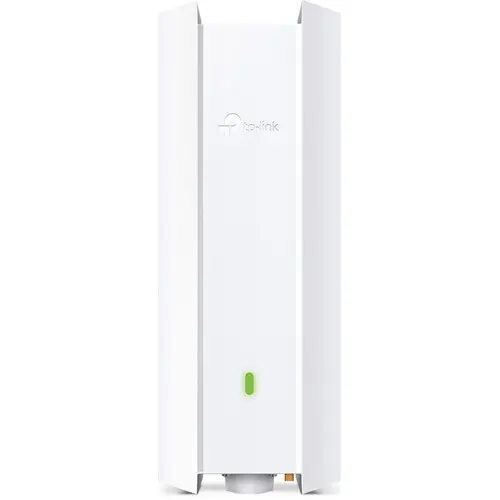
The EAP650-Outdoor is a Wi-Fi 6 outdoor access point from TP-Link’s Omada SDN product line. Despite being outdoor-rated, its rugged design makes it suitable for the mobile site’s varied deployment environments.
Hardware #
| Attribute | Value |
|---|---|
| Model | TP-Link Omada EAP650-Outdoor |
| Wi-Fi Standard | Wi-Fi 6 (802.11ax) |
| Bands | Dual-band (2.4GHz + 5GHz) |
| Speed | AX3000 (574 + 2402 Mbps) |
| Antennas | 2x2 internal (2.4GHz), 2x2 internal (5GHz) |
| Ethernet | 1x Gigabit RJ45 |
| Power | 802.3at PoE (12.3W typical), from the injector supplied with the AP — the SG2218 has no PoE |
| Weatherproofing | IP67 |
| Operating Temp | -30°C to 70°C |
| Mounting | Wall/pole mount |
Selection Rationale #
- VLAN capable: Supports VLAN tagging per SSID for network segmentation
- API manageable: Omada controller provides REST API for automation
- Wi-Fi 6: Modern standard with improved efficiency and capacity
- Rugged: IP67 rating handles varied mobile deployment conditions
- Omada ecosystem: Matches mobile switch (SG2218) for unified management
- PoE powered: Single cable for power and data
Management #
| Attribute | Value |
|---|---|
| Controller | TP-Link Omada SDN |
| VLAN Support | Yes — per-SSID VLAN tagging |
| API | Yes — Omada controller REST API |
| Automation | deevnet.net Ansible collection (Omada API) |
Roles #
| Role | Description |
|---|---|
| Wireless access | Provides Wi-Fi 6 connectivity for clients |
| SSID-to-VLAN mapping | Multiple SSIDs mapped to VLANs |
| Band steering | Directs capable clients to 5GHz |
Site: home (home) — 2 units
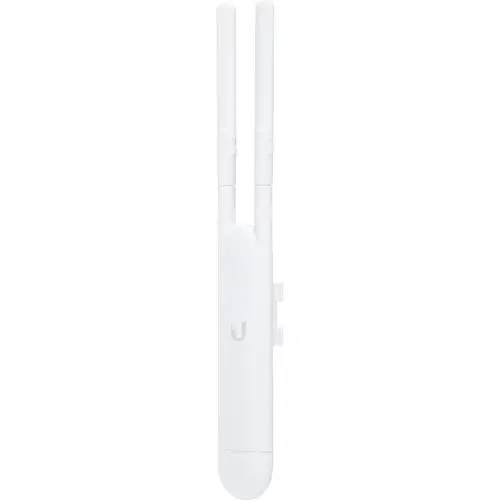
The UAP-AC-M is a compact Wi-Fi 5 mesh-capable access point from Ubiquiti’s UniFi product line. Two units provide coverage throughout the home site.
Hardware #
| Attribute | Value |
|---|---|
| Model | Ubiquiti UniFi UAP-AC-M |
| Wi-Fi Standard | Wi-Fi 5 (802.11ac) |
| Bands | Dual-band (2.4GHz + 5GHz) |
| Speed | AC1200 (300 + 867 Mbps) |
| Antennas | 2x2 MIMO (external) |
| Ethernet | 1x Gigabit RJ45 |
| Power | 802.3af PoE (8.5W max) |
| Weatherproofing | Outdoor rated (IPX5) |
| Mounting | Wall/pole mount |
| Mesh | Wireless uplink capable |
Selection Rationale #
- VLAN capable: Supports VLAN tagging per SSID for network segmentation
- API manageable: UniFi controller provides REST API for automation
- Mesh capable: Wireless uplink for flexible placement
- UniFi ecosystem: Matches home switches (USW-24-G2, US-8)
- Compact: Low-profile design for unobtrusive mounting
- PoE powered: Single cable for power and data
Management #
| Attribute | Value |
|---|---|
| Controller | UniFi Network Application |
| VLAN Support | Yes — per-SSID VLAN tagging |
| API | Yes — UniFi controller REST API |
| Automation | UniFi API (manual currently) |
Roles #
| Role | Description |
|---|---|
| Wireless access | Provides Wi-Fi 5 connectivity for clients |
| SSID-to-VLAN mapping | Multiple SSIDs mapped to VLANs |
| Mesh backhaul | Wireless uplink between units (if needed) |
VLAN and API Capability Summary #
Both access points meet the core selection criteria:
| Requirement | EAP650-Outdoor (mobile) | UAP-AC-M (home) |
|---|---|---|
| VLAN tagging | ✓ Per-SSID | ✓ Per-SSID |
| API management | ✓ Omada REST API | ✓ UniFi REST API |
| Controller-managed | ✓ Omada SDN | ✓ UniFi Network |
| PoE powered | ✓ 802.3at | ✓ 802.3af |
Configuration Management #
| Site | Controller | Automation |
|---|---|---|
| mobile | Omada SDN | deevnet.net Ansible collection (Omada API) |
| home | UniFi Network | UniFi API (manual currently) |
SSID Design #
One SSID per trust class, each carrying one VLAN. The names come from wifi_ssid in
deevnet_vlans, and the controller applies them — inventory is the only declaration
(
ADR-0009).
| SSID | VLAN | Security | Key |
|---|---|---|---|
DVNTM | 10 (trusted) | WPA-Personal | one shared key, from the vault |
DVNTM-IOT | 30 (IoT) | PPSK (security: 4) | one key per tenant, issued by the Deevnet API |
DVNTM-IOTV | 31 (IoT Vendor) | WPA-Personal | one shared key, from the vault |
DVNTM-GUEST | 40 (guest) | WPA-Personal + guest isolation | one shared key, from the vault |
There is deliberately no management SSID. The management segment is reached over the wire.
On DVNTM-IOT the key decides the VLAN. It is a PPSK SSID, so each key in its profile carries
its own VLAN binding, and a device lands on the VLAN of the key it was flashed with — proven on this
AP at firmware 1.3.11 in
CHG-0005 phase 6. A per-key VLAN needs
no controller network object: it is raw 802.1Q tagging, and the core router serves the DHCP.
Who owns what ( ADR-0012 §6):
- Inventory owns the SSID and the PPSK profile.
omada-wireless.ymlcreates them and never rewrites or deletes what it finds. - The Deevnet API owns the keys inside the profile, one per tenant per trust class. A tenant gets
one from
terraform applyand never touches the controller. - The automation therefore does not report those keys as drift. It names the profiles whose contents it is deliberately not inspecting, because reading them would pull every tenant’s password into Ansible’s memory and output.
One entry you may see and should leave alone. The controller refuses to let a PPSK profile reach
zero keys (errorCode -34044), although it will happily create one empty. So when the last tenant key
in a profile is revoked, the API leaves one placeholder named DEEVNET-PLACEHOLDER-DO-NOT-USE. Its
password is generated, returned to nobody and stored nowhere, so it cannot be used to join anything,
and it disappears the moment any real key is issued. It is only ever present when the alternative
would be an empty profile.
Changing any of this is make wireless in deevnet.net, never the controller UI.